How to decline a booking enquiry
Goal
Decline booking enquiries that cannot be fulfilled so ViSN notifies the customer that the request will not proceed.
Related Articles
- Add a Booking Enquiry (link to be added when published)
Declining a Booking Enquiry
Navigate to Enquiry Search
- From the left navigation menu, select
Enquiry, or

- On the dashboard, click
View Allon theNEWtile in the Bookings section - The
NEWtile count shows the total number of new enquiries in black - A count in orange indicates enquiries not yet opened by the current user

Open the Enquiry Details
- In the Enquiry Search results, locate the vehicle row with the
Newstatus label - Click the
>icon (View Enquiry) to open the enquiry - The
Enquiry xxxxxdetails page opens for the selected booking

Decline the Enquiry
- On the status and information bar, click the Decline icon (visible for new enquiries)
 positioned beside the other action buttons on the right.

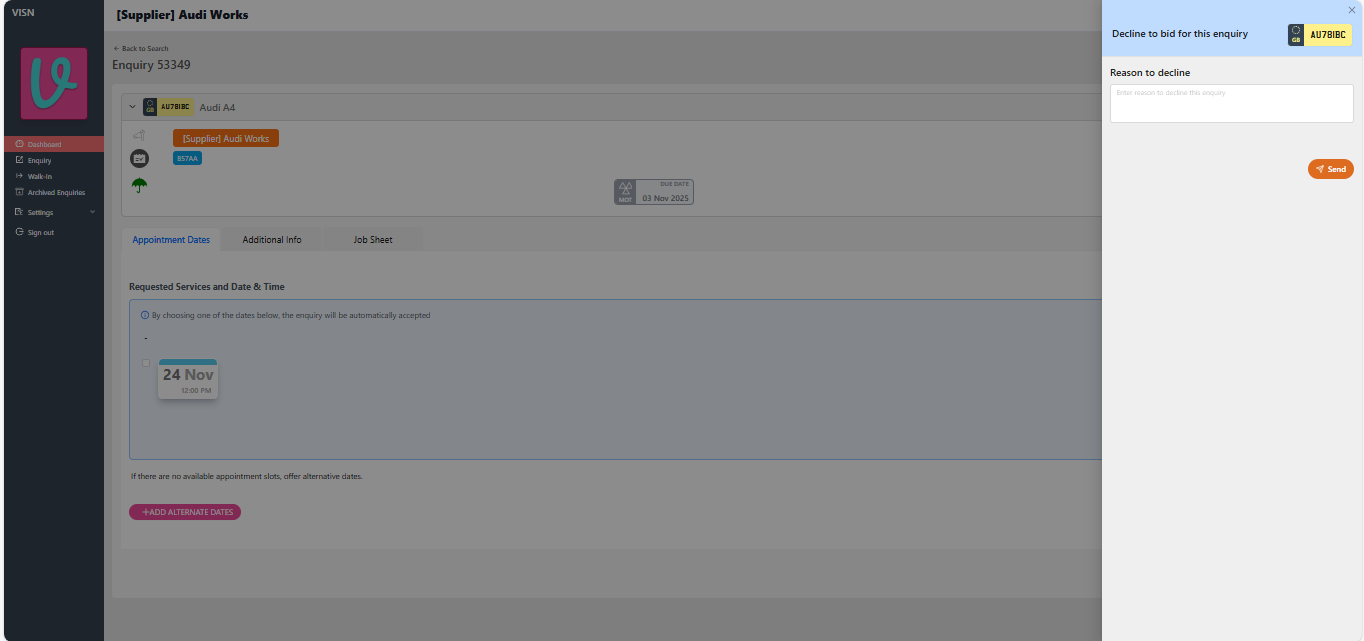
- A drawer opens on the right side prompting for a decline reason
- Enter a clear, business-appropriate explanation in the
Reason to declinefield - Click
Send - The Enquiry Details panel closes and returns to the dashboard

Confirm Dashboard Counters
- The
NEWtile count decreases by 1 - The
DECLINEDtile count increases by 1 - Click
View Allon theDECLINEDtile to review the declined enquiry list - If the counters do not refresh immediately, refresh the dashboard

Review Declined Enquiries
- After clicking
View All, the Enquiry Search page opens with theDeclinedfilter applied - The declined enquiry shows
Declined to bookingin the status label for that row

What Happens Next
- Customer notified: The customer (or lease company) sees the enquiry marked as declined.
- Audit trail: Decline reason is stored against the enquiry for future reference.
Troubleshooting
Counters not updating
Cause: Dashboard caches counts.
Fix: Refresh the dashboard page. If the issue persists, sign out and sign back in or raise a support ticket.
Status: Draft
Category: Protected
Authored By: Arun Kumar on November 20, 2025
Revisions